Installing & Activating
This section provides a step-by-step guide to help you properly install and activate the application. Please follow the instructions carefully to complete the setup without errors and get your application up and running successfully.
Requirements
- PHP 8.2+
- MySQL 5+
Installation
Extract the downloaded zip file from Codecanyon.
You’ll find a zip file named Install.zip after extracting.
Zira needs to be installed in the root folder of your main domain/subdomain.
Upload the Install.zip file to your server
public_htmlor subdomain directory where you intend to run the script.Extract the zip file in that directory.
Now browse:
http://www.your-domain.com/installIf you face problems accessing the installation page, please go to:
http://www.your-domain.com/api/clear-cache
This will clear the cache.Now it's time to create a database.
Database
Log in to your cPanel account.
Scroll down to the Databases section and click on MySQL Databases.
Under Create New Database, enter a name for your database.
Click the Create Database button.
Scroll down to Add New User and enter a username and password for the database.
Click the Create User button.
Scroll down to Add User to Database and select the newly created user and database from the dropdown menus.
Click the Add button.
In the next step, set the permissions for the user by selecting the appropriate checkboxes.
Click the Make Changes button to complete the process.
Your database is now created and a user is assigned to it. You can now use it in the backend.
Setting Up
Browse to:
http://www.your-domain.com/installIf you face problems accessing the installation page, go to:
http://www.your-domain.com/api/clear-cache
This will clear the cache.Fill in the following:
- App Name
- Database Name
- Database User
- Database Password
Click Submit
You can now browse the website.
Admin Credential
Admin panel URL:
http://www.your-domain.com/adminUse the credentials below to log in:
- Email: admin@mail.com
- Password: 123456
Activating the Script
Activation with a Codecanyon purchase key is required.
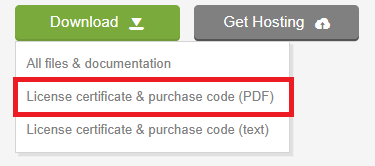
Find the Zira item and click Download.
Click License certificate & purchase code (PDF). You will find the purchase code inside.
Go to Settings → Miscellaneous in the admin panel.
Activate the script using your purchase code.